


How to Use Bybit: A Step-by-Step Guide for Beginners
How to Use Bybit: A Step-by-Step Guide for Beginners
Mastering Bybit: The Ultimate Guide to Cryptocurrency Trading
Bybit has established itself as a premier destination for cryptocurrency trading, particularly in the derivatives market. Whether you’re a seasoned trader or a newcomer to the crypto world, this guide will walk you through the essential steps to navigate Bybit effectively, making the most of its features to enhance your trading experience.
Table of Contents
Creating Your Bybit Account
To get started on Bybit, the first step is to create your account. Here’s a straightforward process:
Visit the Bybit Website: Access Bybit at Bybit.com
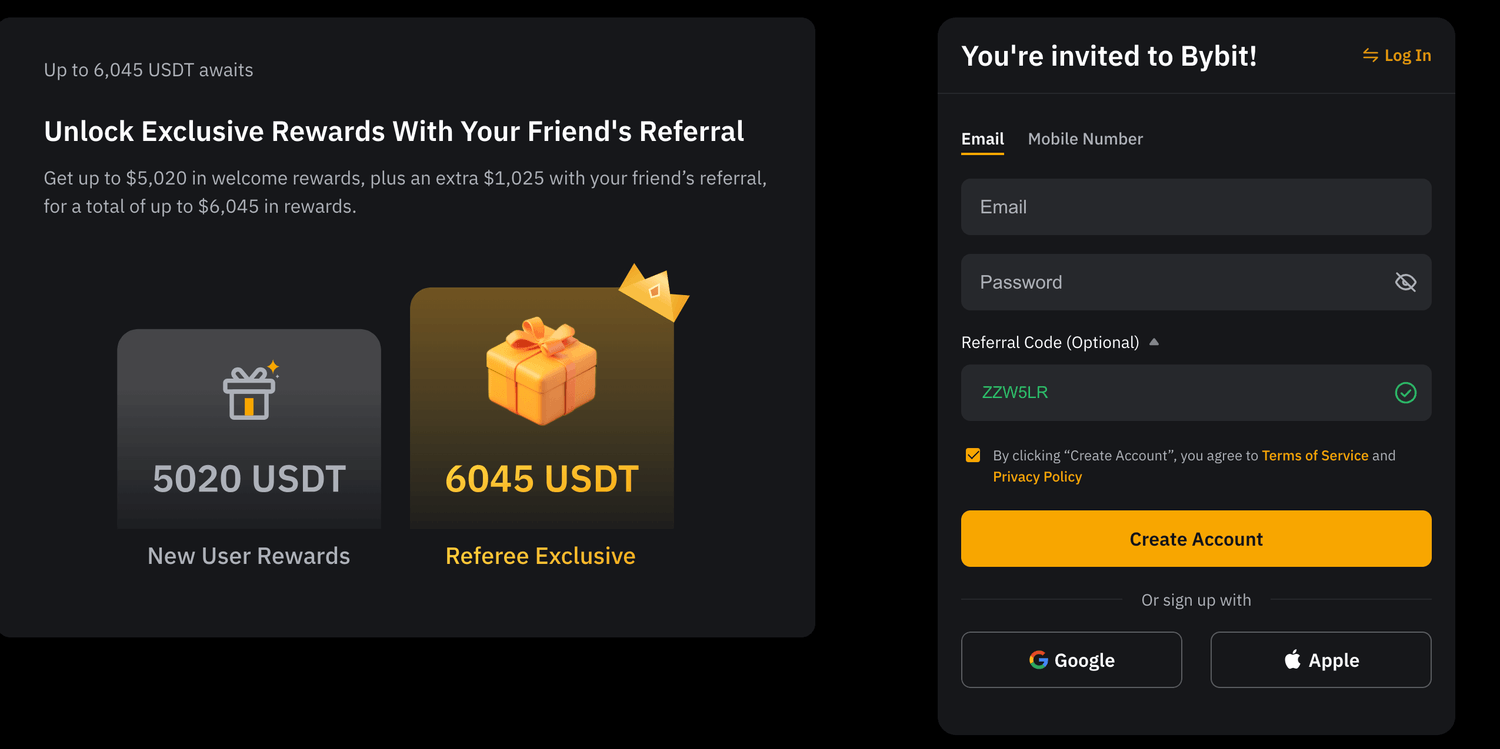
Sign Up: Click on the “Sign Up” button. You can register using your email address or mobile number.
Verify Your Account: After submitting your details, Bybit will send you a verification code via email or SMS. Input this code to activate your account.
Enable Security Features: To ensure your account remains safe, enable Two-Factor Authentication (2FA) on the settings page.
Explore the Platform: Familiarize yourself with the various features and tools available on the platform.
How to Fund Your Bybit Account
Once your account is set up, you’ll need to deposit funds to start trading. Here’s how to do it:
Log into Your Account: After signing up, log into your Bybit account.
Access the ‘Assets’ Section: Located at the top of your dashboard, click on “Assets” and then select “Deposit.”
Choose Your Cryptocurrency: Bybit supports various cryptocurrencies such as Bitcoin (BTC), Ethereum (ETH), and Tether (USDT). Select the currency you want to deposit.
Get Your Deposit Address: Bybit will generate a unique wallet address for you to transfer your funds. Copy this address.
Transfer Funds: Use your personal wallet or another exchange to send cryptocurrency to the generated address.
Wait for Confirmation: Depending on the chosen cryptocurrency, funds may take a few minutes to an hour to appear in your Bybit account.
Exploring the Bybit Trading Interface
To make the most of your trading experience on Bybit, you should understand its user-friendly interface. Key components include:
Dashboard Layout
Market Overview: Displays real-time prices for various trading pairs. This area is essential for quick reference on market fluctuations.
Trading Chart: A comprehensive tool for analyzing price movements over several time frames, aiding in effective decision-making.
Order Book: Indicates the buy and sell orders currently active, giving traders insights into market depth and potential price directions.
Order Types
Bybit offers several order types to suit different trading strategies:
Market Orders: Execute trades immediately at the best available price.
Limit Orders: Set specific prices to buy or sell, allowing for more controlled trades.
Conditional Orders: Execute trades based on certain conditions, perfect for managing risk.
Executing Your First Trade on Bybit
Now that you're set up and familiar with the interface, let’s execute your first trade. Follow these steps:
Select Your Trading Pair: Choose a cryptocurrency pair, like BTC/USDT, from the market options.
Choose Your Order Type: Decide if you want to place a market, limit, or conditional order based on your strategy.
Set Leverage: Bybit allows traders to use leverage to amplify gains (and losses). Choose a leverage level that suits your risk tolerance.
Input Trade Details: Enter the quantity of the asset you want to buy or sell, and specify any additional parameters.
Place Your Trade: Click “Buy/Long” for a bullish position or “Sell/Short” for a bearish position. Monitor the trade through your open positions section.
Understanding Risk Management
Proper risk management is crucial in trading, especially in the volatile world of cryptocurrency. Here are key practices to help you manage risk effectively:
Utilizing Stop-Loss Orders
Set stop-loss orders to automatically close your position if the market price moves against you. This is a critical strategy for preserving capital in a volatile market.
Adjusting Leverage
Higher leverage can amplify both potential profits and losses, so adjust your levels according to your risk appetite. Beginners are often encouraged to start with lower leverage until they are familiar with market dynamics.
Regularly Review and Adjust Positions
Monitor your open positions continuously, adjusting stop-loss and take-profit orders as the market conditions change.
Leveraging Advanced Features
Bybit provides several advanced features that cater to both novice and experienced traders:
Copy Trading
Bybit’s copy trading feature allows you to replicate the trades of successful traders. This is an excellent opportunity for beginners to learn and potentially earn simultaneously.
Trading Competitions
Bybit hosts periodic trading competitions where traders can enter to win substantial prizes. Participating in these events can provide a thrilling way to enhance your trading skills.
API Integrations
For tech-savvy traders, Bybit offers API access, enabling them to build automated trading strategies and analyze market trends programmatically.
Conclusion
Bybit stands out as a premier platform for cryptocurrency trading, offering a wide range of features that cater to both beginners and seasoned traders. By following this guide, you can effectively navigate Bybit, execute trades confidently, and manage risks prudently.
Ready to dive deeper into cryptocurrency trading? Join Bybit today and start exploring all the opportunities it has to offer.
Written by:
Osmaan Mooraby
SHARE


Trending
Supergrow Ai
Linkedin Automation Tool
Quis nostrud exercitation ullamco..
Incididunt ut labore et dolore magna aliqua..

About me

Hi there 👋 My name is Osmaan Mooraby, I'm the owner of This Blog. One of my favorite things is digital marketing and crypto trading


Osmaan Mooraby All Rights Reserved